
SEO vs. Google Ads: Which Is Better for Your Business in 2026?
SEO vs. Google Ads in 2026: Discover the key differences, costs, benefits, and results of both strategies. Learn which digital marketing…
Read article
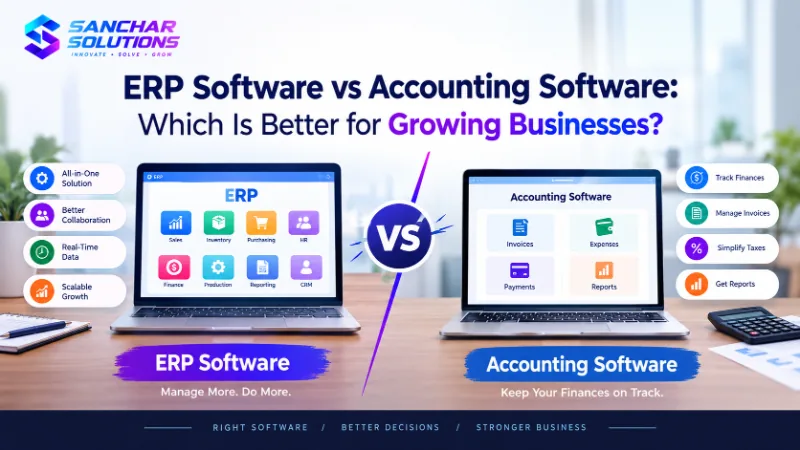
Every business needs a reliable way to manage its finances, track expenses, and keep daily operations organized. In the beginning, a simple accounting tool may be enough. It helps business owners record transactions, prepare invoices, manage payments, and understand their financial position.
But as a business grows, things can become more complicated. There may be more employees, more customers, larger inventories, multiple departments, and an increasing number of daily transactions. Managing all this information through separate tools can take extra time and create confusion.
This is where the difference between ERP software and accounting software becomes important. Both tools help businesses manage information, but they serve different purposes.
Accounting software mainly focuses on financial activities, while ERP software connects different business functions through a shared system. Understanding these differences can help business owners choose the right solution for their current needs and future plans.
Accounting software for business helps companies record, organize, and manage financial information. It is commonly used for invoicing, expense tracking, payment management, tax calculations, bank reconciliation, and financial reporting.
For a small business, accounting software can make everyday financial tasks easier. Instead of maintaining several spreadsheets, the business can keep important financial records in one place.
For example, a small consulting company may use accounting software to prepare invoices, record payments from clients, monitor outstanding balances, and calculate monthly expenses. This makes it easier to understand how much money is coming in and going out.
Accounting software is often a practical choice for businesses that have straightforward operations and mainly need help managing their finances.
However, accounting software may not cover every operational requirement. A business may still need separate tools for inventory, employee management, sales, purchasing, and project tracking. When information is spread across several systems, employees may have to enter the same details more than once.
As the company grows, these extra steps can make daily work harder to manage.
Enterprise Resource Planning, commonly known as ERP, is a type of software that helps businesses manage multiple departments and processes through one connected system.
Depending on the selected platform, ERP software may include finance, inventory, purchasing, sales, order management, human resources, production planning, and reporting.
The main advantage is that different teams can work with shared business information rather than relying on disconnected applications.
For example, imagine a company that sells products online and through physical stores. When a customer places an order, the sales team needs order details, the warehouse needs inventory information, and the finance team needs payment records.
With a suitable ERP system, these activities can be connected. Employees can access the information they need without constantly asking other departments for updates.
ERP software can be particularly useful when business processes become more complex and management needs a clearer picture of overall performance.
For growing organizations, an ERP system for growing businesses can help bring important operations together and reduce the effort required to coordinate different teams.
Although both systems may include financial features, their main purposes are different.
Accounting software focuses on financial management. It helps businesses maintain accurate financial records, prepare invoices, monitor expenses, and generate reports.
ERP software focuses on wider business management. It can connect financial records with other functions, such as inventory, purchasing, sales, and operations.
Consider a manufacturing business. Its accounting team may use accounting software to record supplier payments and customer invoices. However, the company also needs to track raw materials, production schedules, warehouse stock, and customer orders.
Accounting software alone may not provide all these functions. An ERP system can bring these activities together when the required modules are available.
The right choice depends on the number of processes a business needs to manage, its budget, and how closely its departments need to work together.
A larger system is not automatically better. Businesses should select software based on actual requirements rather than paying for features they may never use.
Accounting software may be the right option when a business has relatively simple operations and needs a reliable way to manage financial records.
It can work well for freelancers, consultants, small service providers, and businesses with limited inventory or operational complexity.
Here are a few situations in which accounting software may be sufficient:
The main requirement is invoicing and expense management.
The business has a small team and straightforward workflows.
Financial reporting is more important than department-wide coordination.
Existing tools are working well and do not create major delays.
The company does not need advanced inventory or production management.
For example, a freelance designer may need to send invoices, track client payments, record software subscriptions, and prepare financial summaries. A full ERP system may add unnecessary complexity to these tasks.
In this situation, accounting software can provide the required functionality without requiring a large implementation project.
The important point is to review your business needs regularly. Software that works well today may not be enough after your operations expand.
A business should consider ERP software when managing different operations through separate tools starts creating problems.
One common sign is that employees spend too much time collecting information from different departments. Another is that managers cannot easily understand current inventory levels, outstanding orders, costs, and financial performance in one place.
For example, a distributor may use one application for accounting, another for inventory, and spreadsheets for purchase orders. When stock information is not updated correctly, the sales team may promise products that are unavailable.
An integrated system can help reduce this type of communication gap.
Businesses may also consider ERP when they open additional locations, increase their product range, hire more employees, or experience a significant increase in transactions.
Before making the switch, identify the problems you want to solve. If the main issue is inaccurate inventory, focus on inventory management and its integration with accounting. If several departments face disconnected workflows, a broader ERP solution may be more appropriate.
A successful upgrade should make work easier, not introduce unnecessary processes.
The benefits of ERP software depend on how well the system matches the organization's requirements. When implemented properly, it can improve visibility, reduce duplicated work, and help teams coordinate their activities.
When departments work with connected data, managers can find important information more easily. Depending on the system, they may review sales activity, stock levels, purchasing records, and financial reports from a central platform.
This can help teams identify problems earlier and make decisions using more consistent information.
Disconnected systems often require employees to enter the same information multiple times. This increases workload and creates opportunities for mistakes.
ERP software can reduce repeated data entry by connecting suitable workflows. For example, an approved sales order may update related inventory and billing processes when the system is configured to support those actions.
Sales, finance, purchasing, and warehouse teams often depend on information from one another. A shared system can make it easier to access relevant updates and understand the status of a transaction.
This is particularly useful when a company handles many orders or operates across multiple locations.
ERP systems can combine information from different departments to support operational and financial reporting. Managers can use these reports to review performance, identify delays, and plan resources.
The accuracy of these reports still depends on correct data entry and suitable system configuration.
As a company expands, its workflows may become more complicated. A properly selected ERP system can help the organization manage additional users, locations, products, and processes without relying entirely on spreadsheets and disconnected tools.
These are some of the main benefits of ERP software, although the results depend on implementation quality, employee adoption, and ongoing maintenance.
Modern companies need more than financial records to understand how their operations are performing. They also need visibility into customers, projects, inventory, employee tasks, and internal workflows.
Business management software helps organize these activities and gives teams a more structured way to complete their work.
Depending on the company's needs, this may involve an ERP platform, a customer relationship management system, project management tools, or a combination of connected applications.
For smaller companies, starting with a few essential tools may be more practical than implementing a large system immediately. As requirements change, businesses can review whether the existing applications can integrate with one another or whether a more comprehensive solution is needed.
The goal is to choose technology that supports everyday work, improves access to information, and can adapt as the organization develops.
ERP implementation involves planning, configuring, testing, and introducing the system into a business. It may also include transferring existing data, connecting other applications, training employees, and providing ongoing support.
A common mistake is to focus only on software features without preparing the people and processes that will use the system.
Before starting an ERP implementation, businesses should document their current workflows and identify the biggest operational challenges. They should decide which features are essential, which data needs to be transferred, and which employees will be responsible for each process.
Testing is equally important. Employees should check whether invoices, inventory records, order information, and reports work as expected before the system is fully adopted.
Businesses should also plan for costs beyond the initial software purchase. These may include configuration, integration, employee training, data migration, maintenance, and future upgrades.
A clear implementation plan can help reduce disruption and make it easier for employees to understand the new system.
Sometimes, ready-made accounting or ERP software does not match a company's specific workflows. A business may need a particular approval process, a specialized reporting dashboard, or an integration with an existing application.
In these cases, custom software development may be worth considering.
Custom solutions can be designed around the organization's requirements, but they also require careful planning. Development costs, maintenance, security, future updates, and integration complexity should all be considered.
Before building a new system, compare the cost and functionality of existing software with the benefits of customization. In some cases, configuring an existing ERP platform may be enough. In others, a custom application or API integration may solve the problem more effectively.
Sanchar Solutions offers software development services that include ERP systems, CRM solutions, API development, cloud solutions, and legacy system modernization. Businesses can explore its software development services to learn more about available options.
The right solution should address a clear business need rather than add technology for its own sake.
Business process automation can reduce repetitive work by connecting tasks and triggering actions according to defined rules.
For example, a business may automate invoice notifications, approval reminders, order updates, or routine reporting. When these workflows are connected to suitable accounting or ERP software, employees may spend less time on manual follow-ups.
However, automation works best when the underlying process is already clear. Automating an inefficient workflow may simply make the same problem happen faster.
Businesses should first review how work is completed, remove unnecessary steps, and then identify tasks that can be automated safely.
The result may be a more organized operation, fewer repeated tasks, and better use of employee time.
Integrated business software connects applications so that relevant information can move between them. This does not always require replacing every existing tool with a single ERP platform.
For example, a company may continue using its accounting application while integrating it with inventory management, a CRM system, or an online store. The suitability of this approach depends on available integrations, data quality, and the complexity of the workflows.
For growing companies, integration can provide a practical middle ground between using disconnected applications and replacing the entire software setup.
Sanchar Solutions provides software and integration-related services to help businesses address their technology requirements. You can also visit the Sanchar Solutions website to explore its broader IT and digital services.
ERP software and accounting software serve different purposes, and the best choice depends on how a business operates.
Accounting software is often enough for companies that mainly need to manage invoices, expenses, payments, and financial reports. ERP software becomes more relevant when a business needs to connect multiple departments, coordinate complex workflows, and manage information across its operations.
Before upgrading, review your current challenges, estimate the cost of change, and identify the features that will make a practical difference. A phased approach may help reduce disruption and give employees time to adapt.
Ultimately, the right software should make everyday work more organized, improve access to reliable information, and support future growth. By choosing suitable software solutions for businesses and planning implementation carefully, companies can build a stronger foundation for their next stage of development.
Our team of developers, SEO specialists and marketers has delivered 350+ projects for clients in 10+ countries. We write about what we practise every day.
Engineering custom software solutions that streamline your operations, automate tasks, and solve your unique business challenges.
Explore Software Development ServicesSEO vs. Google Ads in 2026: Discover the key differences, costs, benefits, and results of both strategies. Learn which digital marketing…
Read articleidentifying your priorities and discussing the requirements of your project. Before selecting any service provider, review its service…
Read articleappear in local Google searches and Google Maps results. For example, imagine someone in Noida searches: SEO agency in Noida Software…
Read articleShare your requirements and get a free consultation, timeline and fixed-price quote within 24 hours.